• Duration45 days
  • Topics11
  • SoftwareAI

Explore the Future of Creativity and Technology with Generative AI at IAM

Design, AI & Marketing

Generative Artificial Intelligence is transforming how people create, communicate, design, develop ideas, and solve problems across the digital world. From generating written content and visual concepts to creating images, videos, presentations, marketing materials, and digital experiences, Gen AI is opening new possibilities for students, creative professionals, entrepreneurs, designers, and aspiring technology specialists. As businesses increasingly explore AI-powered workflows, understanding how to use generative AI tools effectively has become a valuable skill for people who want to remain adaptable in a rapidly evolving professional environment.

Gen AI

Course · 45 days

You'll learn · 01/11

01About this course

About thecourse.

45 days
Duration
11
Modules
Ask about the next batch→

At IAM – Institute of Animation and Multimedia, the GEN AI course is designed to introduce learners to the concepts, tools, workflows, and practical applications of Generative Artificial Intelligence. The course focuses on helping students understand how AI systems generate new content, how to communicate effectively with AI tools, how to refine AI-generated outputs, and how to incorporate these technologies into creative and professional tasks. Rather than treating artificial intelligence as a technology that operates independently of human creativity, the learning approach encourages students to use AI as a tool for ideation, experimentation, productivity, and problem-solving.

Whether you want to explore AI image generation, improve your content creation process, develop marketing campaigns, produce visual concepts, generate video ideas, automate repetitive tasks, or understand how generative AI is influencing the creative industries, this course offers a structured starting point. Students can explore how text-based AI assistants, image-generation platforms, AI video tools, and other generative systems can support different stages of a project, from initial research and brainstorming to production, editing, refinement, and final presentation.

The course is relevant to learners who are new to artificial intelligence as well as individuals who already work with digital content, graphic design, animation, multimedia, communication, or marketing. No assumption should be made that every learner has a programming background. The learning experience can begin with fundamental concepts and gradually progress towards practical workflows, more advanced prompting techniques, tool selection, creative experimentation, and project development. Any specialist programming or technical components can be explored according to the course structure and learner requirements.
The course,chapter by chapter.

  1. 01

    Course Summary

    Learn Generative Artificial Intelligence (Gen AI) at IAM – Institute of Animation and Multimedia and explore how AI-powered tools can transform creativity, content production, design, animation, digital marketing, and multimedia workflows. Develop practical skills in AI prompting, text and image generation, AI-assisted video creation, creative automation, and responsible AI use through hands-on projects designed to connect emerging technology with real-world creative and professional applications.

  2. 02

    Eligibility and Preparation

    For an introductory Generative AI programme, learners may benefit from the following preparation: basic computer and internet skills; familiarity with common digital applications; an interest in artificial intelligence, creative technology, content development, design, marketing, or productivity; willingness to experiment with prompts and evaluate different outputs; a readiness to participate in practical exercises and project work.

    Prior programming experience may not be necessary for a beginner-level, tool-focused course. However, students interested in model development, API integrations, code-based automation, or advanced technical AI applications may need additional technical preparation.

    Learners should also understand that some AI platforms require accounts, have age restrictions, impose usage limits, or offer paid features. Access to specific tools should be explained before the programme begins.

  3. 03

    Learning Outcomes

    After completing the programme, learners should have a foundation for using Generative AI more confidently and responsibly.

    By the end of the course, learners work towards understanding the core concepts and common applications of Generative AI; recognising the differences between major categories of generative tools; preparing clear prompts for text, image, and selected multimedia tasks; using AI assistants to support brainstorming, writing, research organisation, and productivity; exploring AI-generated visual concepts for design and creative projects; understanding potential applications of AI in video, animation, and multimedia workflows; applying AI-assisted methods to content development and digital marketing; reviewing outputs for quality, accuracy, relevance, and consistency; recognising limitations such as hallucinations, bias, and unreliable outputs; understanding responsible practices involving privacy, copyright, licensing, and attribution; developing selected practical projects using appropriate generative tools; explaining how AI contributed to a project and identifying the human decisions involved; recognising areas where further technical or creative training may be required.

→Try it

Describe it, then direct it.

Generative AI turns a written prompt into an image, a voice or a video. Pick a prompt to see the idea. This is an illustration, not a live AI model.

> ▍

// Raw vs final

From a line of textto a picture.

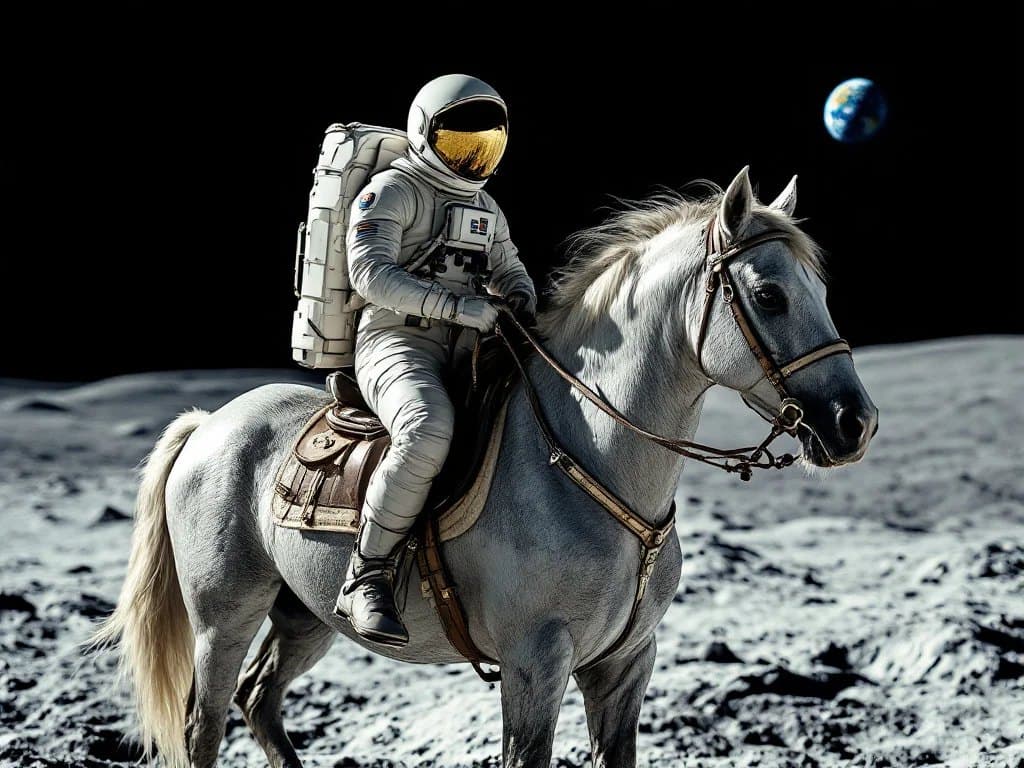
Generative AI starts with a written description. The image on the right was generated by a text-to-image model from exactly the prompt on the left.

> prompt

a photograph of an astronaut riding a horse on moon

model: Flux Pro · text-to-image

What you write
What you get

Image: VulcanSphere, generated with Flux Pro, public domain, via Wikimedia Commons (cropped)

  1. Stage 011/3

    Describe

    The subject, setting, light and style are written down as a prompt.

  2. Stage 022/3

    Generate

    The model produces several options, and the most promising one is picked.

  3. Stage 033/3

    Refine

    The prompt is adjusted and the image edited until it fits the brief.

02Course content

What you'lllearn.

The curriculum in the order you'll meet it. Play through it module by module, or jump to any one.

11
Modules
105
Topics
Module 01 / 11

Introduction to Generative Artificial Intelligence

Topics covered · 8

  • Meaning and definition of Generative AI
  • Evolution of artificial intelligence and generative technologies
  • Difference between traditional software, predictive AI, and generative AI
  • Overview of text, image, audio, video, and code generation
  • Introduction to AI models and common terminology
  • Everyday applications of generative systems
  • Benefits, limitations, and realistic expectations
  • Understanding the role of human creativity and judgement

Up next

All modules

03Skills you'll build

Step bystep.

15 stages, in the order the course builds them up.

  • 01Step 1 of 15

    Explain the meaning of Generative Artificial Intelligence and distinguish it from other common AI applications

  • 02Step 2 of 15

    Understand introductory concepts related to machine learning, generative models, large language models, and multimodal AI

  • 03Step 3 of 15

    Identify different categories of generative AI tools and select suitable applications for specific tasks

  • 04Step 4 of 15

    Write clear, structured prompts that communicate objectives, context, audience, format, style, and constraints

  • 05Step 5 of 15

    Refine AI outputs through follow-up instructions, feedback, and iterative experimentation

  • 06Step 6 of 15

    Use AI assistants to support brainstorming, writing, research organisation, and content development

  • 07Step 7 of 15

    Explore text-to-image generation and communicate visual requirements through detailed prompts

  • 08Step 8 of 15

    Understand how AI-assisted video, audio, animation, and multimedia tools may fit into creative workflows

  • 09Step 9 of 15

    Apply AI-assisted methods to graphic design ideation and marketing content development

  • 10Step 10 of 15

    Organise selected tasks into structured workflows and identify opportunities for responsible automation

  • 11Step 11 of 15

    Review generated content for factual accuracy, relevance, originality, consistency, and quality

  • 12Step 12 of 15

    Recognise limitations such as hallucinations, bias, inconsistent outputs, and missing context

  • 13Step 13 of 15

    Understand introductory considerations relating to copyright, licensing, privacy, confidentiality, and responsible AI use

  • 14Step 14 of 15

    Develop practical projects that demonstrate the application of generative AI to creative or professional tasks

  • 15Step 15 of 15

    Present project outcomes and explain the decisions involved in generating, selecting, and refining AI-assisted work

01–03 / 15

04What you get

Included withthe course.

10 things you take away, from the first model to the finished showreel.

  • Understand What Generative AI Is and How It Works

    A strong understanding of Generative AI begins with knowing what makes it different from traditional software and other forms of artificial intelligence. Generative AI refers to AI systems that can produce new content, including text, images, audio, video, code, and other forms of digital output, based on patterns learned during training and the instructions or information provided by users.

    Students explore the fundamental concepts behind generative systems, including AI models, machine learning, large language models, multimodal AI, training data, prompts, generated responses, and output refinement. The course introduces these concepts in an accessible manner so learners can understand the possibilities and limitations of AI without becoming overwhelmed by technical terminology.

    Learners also examine how different AI tools are designed for different tasks. A text-generation assistant may be useful for developing ideas, summarising information, or drafting content, while an image-generation system may help visualise a concept. AI video platforms may support storyboard development or the creation of short visual sequences, whereas specialised AI applications may assist with transcription, audio production, research, or workflow automation.

    Understanding these distinctions helps students select suitable tools instead of relying on a single application for every task. They learn that useful AI outcomes depend on the quality of instructions, the available context, the capabilities of the selected model, and the human decisions involved in reviewing and improving the result.

  • Develop Effective AI Prompting Skills

    Prompting is an important skill in generative AI because the instructions supplied to an AI system influence the relevance, clarity, style, and usefulness of its output. A vague request may produce generic results, while a well-structured prompt can provide clearer direction and improve the quality of the response.

    Students learn how to develop prompts by defining the task, identifying the intended audience, supplying relevant context, specifying the required format, establishing a suitable tone, and explaining any important constraints. They explore how to communicate expectations clearly, ask follow-up questions, request alternative versions, and refine outputs through multiple iterations.

    The course can introduce different prompting approaches for different purposes. For example, a content creator may need an informative article outline, a graphic designer may require a detailed visual concept, and a digital marketer may want campaign ideas for a particular audience. Each task requires different instructions, criteria, and evaluation methods.

    Students also learn to recognise when an AI response does not meet the intended objective. Instead of accepting the first result, they practise reviewing the output, identifying missing information, adjusting instructions, and generating improved alternatives. This iterative process encourages active thinking and reinforces the importance of human judgement.

    Prompting exercises can include writing professional emails, developing campaign concepts, creating product descriptions, preparing educational explanations, generating visual briefs, designing content calendars, and organising information into structured formats. These exercises help learners connect prompt engineering with practical tasks rather than treating it as an isolated technical activity.

  • Explore AI-Powered Content Creation

    Content creation is one of the most accessible applications of generative AI. AI tools can help users develop initial ideas, organise information, produce draft text, explore different writing styles, and adapt content for different audiences and platforms. However, the effectiveness of these tools depends on the user's ability to provide appropriate context and review the generated material carefully.

    Students explore how generative AI can support blogs, articles, website content, social media posts, video scripts, advertisements, product descriptions, presentations, educational material, and other forms of digital communication. They learn how to use AI to move from a basic idea to a structured draft and how to revise that draft for accuracy, originality, tone, readability, and audience relevance.

    The course also introduces the importance of maintaining a consistent brand voice. Learners can practise providing brand information, audience details, communication goals, and preferred writing styles to guide content generation. They can compare alternative versions of a message and determine which version best serves the intended purpose.

    AI-generated writing must not automatically be treated as accurate or publication-ready. Students learn to verify factual statements, check important claims against reliable sources, remove unsupported information, and edit the final content so it reflects the actual requirements of the task.

    The objective is to develop learners who can use AI to support the content creation process while retaining responsibility for the quality, accuracy, originality, and relevance of the final work.

  • Learn AI Image Generation and Visual Concept Development

    Generative AI has created new ways to explore visual ideas, experiment with artistic directions, and communicate concepts before investing time in full production. AI image-generation tools can transform written descriptions into visual outputs, allowing users to explore compositions, environments, characters, objects, moods, colours, and visual styles.

    Students explore how descriptive prompts can be used to communicate visual requirements. They learn to specify the subject, setting, composition, lighting, colour palette, atmosphere, perspective, visual style, and intended use of an image. Through practical exercises, learners can compare different prompts, identify inconsistencies, and refine their instructions to obtain more suitable results.

    AI-assisted visual development can be useful for advertising concepts, mood boards, creative presentations, campaign planning, product visualisation, storytelling, and early-stage design exploration. For learners interested in animation and multimedia, these techniques can also help with visual references, environment concepts, character exploration, and storyboard planning.

    The course encourages students to understand the difference between generating an image and producing a polished, usable visual asset. Generated outputs may contain visual inconsistencies, inaccurate details, unwanted elements, or composition problems. Students should learn to review these issues and use suitable editing or design tools when refinement is required.

    They also explore the importance of maintaining visual consistency across a series of assets. This may involve using reference images, carefully structured prompts, consistent descriptions, and iterative review processes, depending on the capabilities of the tools being used.

    The emphasis is on developing visual communication skills alongside AI tool proficiency, helping learners understand how to turn an initial visual idea into a more considered creative outcome.

  • Discover AI-Assisted Video, Animation, and Multimedia Workflows

    Generative AI is increasingly being explored in video production, animation, advertising, digital storytelling, and multimedia content development. Depending on the tool, AI may assist with script ideas, storyboards, scene concepts, voice generation, subtitles, video editing, image-to-video experimentation, or the creation of short visual sequences.

    At IAM, the course can connect generative AI concepts with the wider creative production process. Students explore how AI can support pre-production activities such as brainstorming, script development, visual references, character concepts, scene planning, and storyboard preparation. They can also examine how AI-assisted tools may support selected production and post-production tasks.

    For example, a learner developing a promotional video could use AI to generate alternative concepts, organise a script, create a scene-by-scene outline, prepare visual references, and investigate tools for editing or narration. The learner would then evaluate the generated material, select appropriate outputs, and refine the project according to its creative objectives.

    Students interested in animation can explore how AI-generated references and concepts may support early experimentation. However, AI-generated imagery or video is not automatically equivalent to a professionally produced animation. Character consistency, motion quality, timing, continuity, composition, sound, editing, and artistic direction still require careful evaluation and, where necessary, additional production work.

    The course helps learners understand both the opportunities and the practical limitations of AI-assisted multimedia production. It encourages them to use these tools to explore ideas and improve workflows without losing sight of the visual storytelling, design principles, and production standards that make creative work effective.

05Who it is for

Made forpeople like you.

6 kinds of learner this course is built around. Find yours.

  • 01

    Students and Beginners

    Students who want to understand Generative AI from the fundamentals can use this course to explore emerging tools and develop practical digital skills. It provides an opportunity to learn how AI systems can support writing, visual exploration, research, presentations, and project development.

    The course is suitable for beginners who want a structured introduction before deciding whether to pursue a more specialised area of AI, design, multimedia, marketing, or technology.

  • 02

    Graphic Designers and Creative Professionals

    Graphic designers and creative professionals can explore how generative tools may assist with brainstorming, mood boards, concept exploration, visual references, campaign planning, and content development. The course can help them understand how to incorporate AI into their existing workflow while continuing to rely on design fundamentals and professional judgement.

  • 03

    Animation and Multimedia Learners

    Students interested in animation, visual effects, digital filmmaking, and multimedia can investigate how AI may assist with idea development, scripts, storyboards, visual references, and selected production tasks. They can explore the relationship between AI-generated content and established creative workflows.

  • 04

    Digital Marketers and Content Creators

    Digital marketers, social media managers, bloggers, copywriters, and content creators can learn how AI supports ideation, content drafting, audience-specific messaging, campaign planning, and content repurposing. They can also learn why editing, factual verification, brand consistency, and audience understanding remain important.

  • 05

    Business Owners and Entrepreneurs

    Entrepreneurs and business owners can explore how AI tools may support business communication, marketing preparation, product descriptions, presentations, research organisation, and routine administrative tasks. The course can help them identify useful applications while understanding the need to protect confidential information and review important outputs.

  • 06

    Working Professionals

    Professionals from different fields who want to become more familiar with AI-assisted productivity can use the course to explore practical applications relevant to their work. Prior experience with a particular AI tool may be helpful but is not necessarily required for an introductory programme.

Career options: AI Content Creator, AI-Assisted Graphic Design Professional, Digital Marketing Executive, Social Media Content Specialist, AI-Assisted Video Content Creator, Multimedia and Creative Production Assistant, AI Workflow and Productivity Assistant, Freelance AI-Assisted Creative Service Provider, Entrepreneur or Business Owner Using AI Tools

06Career outcomes

Roles you couldgrow into.

Role 01 of 09

AI Content Creator

AI-assisted content creators develop and refine digital content using generative tools. Their work may involve researching topics, generating ideas, preparing initial drafts, creating content variations, and adapting material for different platforms. Strong writing, editing, fact-checking, and audience-awareness skills remain important.

Generative AI is a cross-disciplinary skill rather than a single job qualification. Learning to use AI tools can complement existing capabilities in design, content, marketing, multimedia, communication, and business operations. Career opportunities depend on the learner's overall skill set, practical experience, portfolio, communication abilities, and the requirements of individual employers.

07Projects

What you'llbuild.

7 projects for your portfolio.

  • AI-Assisted Content Campaign

    Develop a content campaign for a fictional or approved business. Students identify the target audience, define the communication objective, prepare content ideas, generate initial drafts, and refine the final material. Deliverables may include a campaign brief, social media captions, a content calendar, and a set of reviewed promotional messages.

  • AI Image and Mood Board Development

    Choose a theme, product, or creative concept and develop a mood board using AI-generated visual references. Students experiment with prompts, compare different visual directions, evaluate consistency, and explain their final selections.

  • AI-Assisted Advertisement Concept

    Prepare a creative concept for a product, service, or event. Students use AI to explore headline options, audience messaging, visual references, and campaign directions. They then refine the concept using suitable design tools and present the final result.

  • Short Video Concept and Storyboard

    Develop a short promotional or storytelling concept. Students create a script outline, divide the story into scenes, prepare visual references, and investigate appropriate AI-assisted video or editing tools. The final deliverable may be a storyboard, animatic, or short edited piece depending on the syllabus.

  • AI-Supported Research and Presentation

    Select a suitable topic and use AI to organise questions, structure research, and prepare an initial presentation outline. Students verify important claims against reliable sources, refine the structure, and deliver a presentation that distinguishes verified information from AI-assisted drafting.

  • Personal Prompt Library

    Create a collection of reusable prompts for a chosen area, such as content creation, graphic design, video planning, or productivity. Each prompt should include its purpose, relevant context, expected output, constraints, and an example of how the result can be evaluated.

08Why IAM

Why studyit here.

  • Learn Through Practical Application

    01

    Generative AI becomes easier to understand when students experiment with real tasks. Practical activities can help learners explore how prompts influence results, how different tools handle different requests, and how generated material can be refined into useful deliverables.

  • Connect AI with Creative Industries

    02

    For learners interested in animation, multimedia, visual communication, and digital content, AI provides an opportunity to explore new methods of ideation and production support. The course can help students understand where generative systems fit into established creative processes.

  • Develop Skills That Complement Existing Knowledge

    03

    AI tools are most useful when combined with clear thinking, subject knowledge, communication, and quality control. Students are encouraged to develop these supporting abilities alongside tool proficiency so that they can evaluate results rather than simply accept generated content.

  • Build Confidence Through Guided Projects

    04

    Project-based learning gives students the opportunity to apply concepts in a structured setting. Depending on the programme, practical assignments can help them develop confidence in prompting, creative experimentation, output evaluation, and presentation.

→How you'll learn

Threestages.

  1. Stage one

    Learn the fundamentals.

    Drawing, timing, composition and the software itself. Small batches, daily feedback from working artists.

  2. Stage two

    Build the reel.

    Studio-style projects with real briefs and real deadlines. Every student finishes with a portfolio they can defend.

  3. Stage three

    Get hired properly.

    Portfolio reviews, mock interviews and introductions to our studio partners. We stay reachable after you graduate.

09FAQ

Questions,answered.

17 questions about the course, admissions and careers.

  • Generative AI is a category of artificial intelligence that can create new content, such as text, images, audio, video, and code, based on patterns learned during training and the instructions or information supplied by users. It is used in areas including content creation, design, communication, research, and productivity.

  • The course is intended to introduce learners to generative AI concepts, prompting, AI-powered content creation, image generation, selected multimedia applications, productivity workflows, and responsible AI use. Practical projects can help learners apply these concepts to real-world creative and professional tasks. The final syllabus will determine the exact tools and modules covered.

  • An introductory, tool-focused Gen AI programme can be suitable for beginners who have basic computer skills and an interest in learning about AI. Students can start with fundamental concepts and progress towards practical prompting and project work. Confirm the entry requirements for IAM's specific programme before enrolment.

  • Not necessarily. Many generative AI applications can be used through ordinary text prompts and graphical interfaces. However, programming may be useful for advanced applications involving APIs, custom integrations, model development, and code-based automation.

  • AI image generation can be included as a learning area, covering prompt writing, visual descriptions, creative experimentation, and output refinement. The exact platforms and depth of image-generation training depend on IAM's syllabus.

  • Yes. Generative AI can assist with brainstorming, mood boards, reference imagery, creative concepts, and some content-development tasks. It does not automatically replace design skills such as typography, layout, composition, colour theory, branding, and final quality control.

→Enquire now

Start Exploring GenerativeAI with IAM

The future of digital creativity and productivity is being shaped by new ways of working with artificial intelligence. Understanding Generative AI can help you explore fresh ideas, experiment with creative tools, organise information, and discover more efficient ways to approach digital tasks.

At IAM – Institute of Animation and Multimedia, take the opportunity to explore how AI can complement creativity, design, content creation, and multimedia workflows. Build your understanding step by step, practise with relevant tools, and develop projects that demonstrate how you can apply generative AI to real-world challenges.

Whether you are a student exploring emerging technology, a creative learner interested in AI-assisted production, or a professional looking to expand your digital skill set, begin your learning journey by understanding the possibilities, limitations, and responsible applications of Generative AI.

Explore the GEN AI course at IAM and take your first step towards understanding the next generation of creative and digital tools.

Contact IAM for information about the syllabus, course duration, eligibility, fees, available tools, and upcoming batches.

IAM Jalandhar

1st Floor, IAM, Crystal Plaza, SCS 78, opp. PIMS Hospital, Jalandhar, Punjab 144001

+91 98881 22241