• Duration18 months
  • Topics12
  • Software08

Diploma in 3D Animation — Turn Your Imagination into 3D Reality

Animation & Gaming18-Month Diploma

Discover how characters, digital worlds and animated scenes are created through the Diploma in 3D Animation at the Institute of Animation and Multimedia (IAM). Designed for aspiring digital artists and creative learners, this 18-month program introduces the concepts, techniques and production workflows involved in three-dimensional animation.

3D Animation

Diploma · 18 months

You'll learn · 01/12

01About this course

About thecourse.

18 months
Duration
12
Modules
8
Software
Ask about the next batch→

Explore the complete creative journey, from understanding shapes and constructing digital models to developing materials, preparing assets for movement, creating animation and producing polished visual outputs. Learn how different stages of 3D production connect, why technical precision matters and how artistic decisions influence the final result.

At IAM, the learning approach emphasises guidance from working artists, exposure to studio-inspired production pipelines and the development of a showreel that communicates your skills. Through structured learning and practical project work, students can build their understanding of 3D production, experiment with different creative techniques and identify areas in which they want to specialise.

Whether your interests lie in animated characters, gaming visuals, digital environments, visual effects or multimedia production, this diploma offers a starting point for exploring the world of 3D animation. Build your creative foundation, develop your technical understanding and begin working towards a portfolio that reflects your progress as a digital artist.

The course,chapter by chapter.

  1. 01

    Understanding the World of 3D Animation

    Three-dimensional animation is a digital art and production discipline that combines visual design, spatial thinking, movement and technology. It allows artists to create objects, characters and environments that can be viewed from different angles and animated within a virtual space. From cinematic sequences and animated entertainment to game assets, product visualisation and digital advertising, 3D techniques are used across a wide range of creative applications. Understanding the fundamentals of this field helps aspiring artists discover how digital concepts become finished visual experiences.
  2. 02

    Learning the Complete 3D Production Process

    Creating a 3D animation involves multiple interconnected stages. Artists may begin by studying references, planning a concept and creating a basic model. They then develop the model's structure and appearance through modelling, materials and texturing. Depending on the project, the asset may be rigged, animated, positioned in a scene and prepared for lighting and rendering. Each stage contributes to the final result, making it important to understand both individual techniques and the overall production workflow.

  3. 03

    Developing Strong Foundations in Digital Modelling

    Modelling is one of the fundamental skills involved in 3D production. It involves constructing digital representations of objects, characters, props and environments by working with geometry, shape, proportion and detail. A well-developed model should communicate the intended form clearly and be suitable for its planned use. By understanding modelling principles, learners can develop a foundation for creating more complex assets and explore areas such as character modelling, environment creation and product visualisation.

  4. 04

    Understanding Materials, Textures and Visual Appearance

    A model's shape is only one part of its final appearance. Materials and textures help communicate whether an object looks metallic, wooden, plastic, fabric-based or organic. Lighting further influences how its surfaces appear, while camera placement and composition determine how the viewer sees the result. Learning these connected concepts helps aspiring artists understand how visual details contribute to realism, stylisation and overall presentation.

  5. 05

    Exploring Movement, Rigging and Animation Principles

    Animation brings digital assets to life by creating controlled movement over time. This involves more than moving an object between two positions. Artists must consider timing, spacing, weight, balance, anticipation, posing and the intended meaning of an action. Rigging can provide the controls needed to move characters and other suitable assets. Understanding the relationship between rigging and animation helps learners see how a prepared digital model can become part of a visual performance or animated sequence.

  6. 06

    Learning Through Practical Creative Projects

    Practical work gives learners the opportunity to apply concepts, experiment with techniques and understand how different production stages interact. A project may involve creating a simple object, refining a model, developing its materials, preparing a scene or producing a short animation. Reviewing and improving work is an essential part of this process. The actual projects and assignments completed by students should follow IAM's approved curriculum and teaching plan.

  7. 07

    Developing a Portfolio and Showreel

    A portfolio or showreel provides a visual record of an artist's capabilities. It can include selected models, rendered scenes, animation sequences and other relevant creative projects. A strong presentation should make the artist's contribution clear, demonstrate relevant skills and highlight the type of work they want to pursue. IAM emphasises showreel development as part of its approach to preparing learners to communicate their work beyond the classroom.

  8. 08

    Exploring Future Career Directions

    The skills associated with 3D production can be relevant to animation, gaming, multimedia, visualisation and digital content creation. Different roles require different levels of expertise, and some may involve additional software knowledge or specialist training. By exploring multiple stages of the production process, students can begin identifying their interests and determine which areas deserve further practice. Continued learning, portfolio development and experience remain important when preparing for professional opportunities.

  9. 09

    Building a Foundation for Continued Growth

    Digital creative work combines artistic judgement with technical problem-solving. As learners progress, they must become comfortable testing ideas, identifying errors, responding to feedback and refining their results. Developing these habits can support continued learning as software and production methods evolve. The purpose of foundational training is to help learners understand the process, practise essential skills and build a starting point for more advanced creative development.

→Try it

From wireframe to final render.

Every 3D object goes through the same stages. Switch between them to see what each one adds, and move your pointer over the cube to tilt it.

Modelling: the shape is built from points, edges and faces.

// Raw vs final

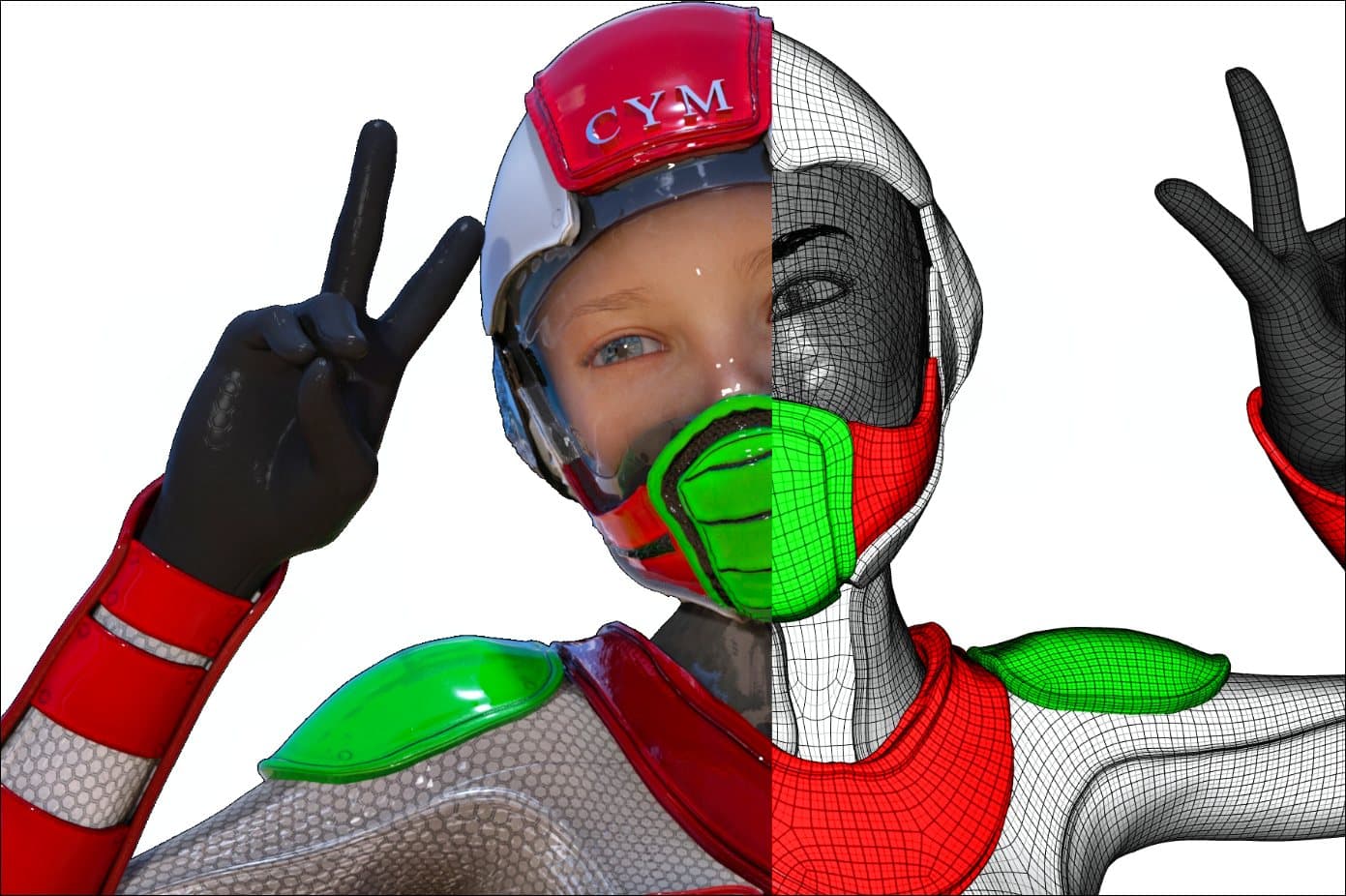
One character.Half mesh, half render.

Under every finished 3D character is a mesh of polygons. This picture shows both at once: the final render on one side, and the wireframe it is built on on the other.

  1. Stage 011/3

    Model

    The shape is built from polygons and kept clean, so it can bend and be animated later.

  2. Stage 022/3

    Texture

    Colour and materials are painted on, so plastic, glass and skin each look right.

  3. Stage 033/3

    Light & render

    Lights and a camera are placed, and the computer calculates the final image.

02Course content

What you'lllearn.

The curriculum in the order you'll meet it. Play through it module by module, or jump to any one.

12
Modules
83
Topics
12
Practicals
Module 01 / 12

Introduction to 3D Animation and the Production Pipeline

Begin by understanding how three-dimensional digital content is created and where animation fits within the wider multimedia industry. Explore the difference between modelling, animation, rendering and other stages of production. Learn how artists use references, concepts and project requirements to guide the creation of a digital scene.

This module introduces the idea that a finished animation is built through a sequence of connected tasks. Understanding this workflow provides a foundation for learning individual techniques and helps students recognise how their work contributes to a larger project.

Topics covered · 6

  • Introduction to 3D graphics and animation
  • Understanding three-dimensional space and digital objects
  • Overview of the animation production pipeline
  • Introduction to assets, scenes, cameras and lights
  • Understanding references, concepts and visual direction
  • Overview of creative roles in 3D production

Practical application

Analyse a simple 3D scene and identify the assets and production stages required to create it.

Up next

All modules

03Skills you'll build

Step bystep.

7 stages, in the order the course builds them up.

  • 01Step 1 of 7

    Understand the Foundations of 3D Graphics

    Develop an understanding of three-dimensional space, object geometry, scene organisation and the relationship between digital assets and the environments in which they are presented. Learn how basic forms can be combined and refined to create recognisable objects, props and visual elements.

  • 02Step 2 of 7

    Create and Refine Digital Models

    Explore the process of constructing 3D assets using suitable modelling techniques. Understand how proportions, topology, silhouettes and surface details influence the quality of a model. Learn to analyse references and translate visual information into digital forms appropriate to a project's purpose.

  • 03Step 3 of 7

    Develop Materials and Surface Details

    Understand how materials and textures influence colour, reflectivity, roughness and surface appearance. Learn how different surface treatments can change the visual character of an object and why material consistency matters when multiple assets appear together in a scene.

  • 04Step 4 of 7

    Understand Rigging and Animation

    Explore how suitable models are prepared for movement and how keyframes, poses, timing and spacing affect animation quality. Develop an understanding of how artists create readable actions and refine movement through repeated observation and practice.

  • 05Step 5 of 7

    Present Scenes Through Lighting and Rendering

    Learn how lighting, shadows, cameras and composition influence a rendered scene. Understand how the final output communicates depth, atmosphere and visual focus, and why reviewing the result is an important step before presenting completed work.

  • 06Step 6 of 7

    Work Through a Structured Production Pipeline

    Understand how assets and tasks move through different stages of a project. Develop awareness of file organisation, naming conventions, project revisions and the importance of preparing work for review or further production.

  • 07Step 7 of 7

    Build and Present Creative Work

    Learn to select suitable projects, review their quality and present them in a portfolio or showreel. Understand how to communicate the techniques used, the purpose of each project and the skills demonstrated by the final result.

01–03 / 07

04Software

The toolsyou'll use.

8 programs, circling the one in focus. Pick any logo to bring it to the centre.

01 / 08Design & textures

Image editing, retouching and digital painting.

05What you get

Included withthe course.

10 things you take away, from the first model to the finished showreel.

  • Understand the Complete 3D Animation Pipeline

    Learn how a 3D project progresses from the initial idea to its final rendered output. Understand the relationship between modelling, texturing, lighting, rigging, animation and rendering, and how each stage contributes to the finished result. This broader understanding helps you recognise where different creative decisions are made and why coordination between production stages matters.

  • Develop Digital Modelling Skills

    Explore how three-dimensional objects, props, environments and characters are constructed in digital space. Develop an understanding of shape, form, proportion, geometry and detail, and learn how these elements affect the appearance and usability of a model. These foundations can help you build assets that are suitable for presentation, animation or further production work.

  • Create Detailed Materials and Textures

    Understand how surface colour, texture and material properties influence the appearance of a 3D object. Explore how artists communicate differences between materials such as metal, wood, fabric, plastic and skin. Learn why suitable surface treatment and consistent material choices help digital assets look more convincing and visually cohesive.

  • Learn the Fundamentals of Lighting and Rendering

    Discover how lighting establishes depth, mood, contrast and visual hierarchy in a 3D scene. Understand how shadows and highlights influence the way objects are perceived, and how rendering converts a prepared scene into a final image or sequence. These concepts help you present your work with greater clarity and visual impact.

  • Explore Character Rigging and Movement

    Learn how a character or object can be prepared for controlled movement through rigging concepts, joints and animation controls. Explore how timing, spacing, posing and motion influence the quality of an animated sequence. The combination of preparation and animation principles helps you understand the relationship between a character's structure and its performance.

06Who it is for

Made forpeople like you.

8 kinds of learner this course is built around. Find yours.

  • 01

    Students Who Want to Enter the Animation Industry

    If you are exploring a creative career after school or another stage of education, this diploma can introduce you to the fundamentals of 3D animation. You can learn how animated content is produced, discover the different roles involved and begin identifying the practical skills needed to progress towards a creative specialisation.

  • 02

    Beginners Who Want Structured 3D Training

    If you have an interest in animation but are unsure where to begin, a structured course can help you understand the sequence of skills involved in creating 3D content. Instead of trying to learn every technique independently, you can work through foundational concepts and build your understanding progressively. Confirm IAM's admission criteria to check whether your current educational background meets its requirements.

  • 03

    Aspiring 3D Character Animators

    This pathway may suit learners fascinated by character movement, expressions, action and visual storytelling. Character animation involves understanding how timing, body mechanics, poses and motion communicate intention. Developing these skills requires observation, repeated practice and the ability to refine movement until it reads clearly.

  • 04

    Students Interested in 3D Modelling and Digital Art

    If you enjoy building objects, designing characters or creating imaginary environments, modelling can be an appealing area to explore. You can develop an understanding of shape, structure, geometry and detail while learning how digital assets are prepared for presentation or use in a larger project.

  • 05

    Aspiring Gaming and Interactive Content Creators

    Learners interested in the visual side of video games can explore how characters, props and environments are developed in 3D. The diploma's foundational concepts may be relevant to game art and interactive content, although specialised game-engine training and real-time asset optimisation may require additional study.

  • 06

    Students Interested in Film, VFX and Digital Storytelling

    Three-dimensional assets and animation are used in many forms of visual storytelling. If you are interested in cinematic scenes, visual effects or digitally created environments, learning the 3D pipeline can help you understand how visual elements are produced. Specific VFX roles may require further training in compositing, simulation or other specialist techniques.

Career options: 3D Animator, 3D Modelling Artist, Character Modelling Artist, Texturing and Look Development Artist, Lighting and Rendering Artist, Junior 3D Generalist, 3D Visualisation Artist, 3D Environment Artist, Animation Production Support

07Career outcomes

Roles you couldgrow into.

Role 01 of 09

3D Animator

A 3D Animator creates movement for digital characters, objects and environments. The role involves developing poses, setting keyframes, adjusting timing and refining movement so that an action communicates its intended meaning. In character animation, artists may work on walking, running, interacting with objects, facial expressions or emotional performances. Object animation may involve making products, props or other elements move naturally or in a deliberately stylised way.

Skills to develop

Animation principles, timing, spacing, posing, body mechanics, keyframing and movement analysis.

Portfolio idea

A short animation demonstrating a clear action, believable movement and thoughtful timing.

Career progression

With further experience and specialisation, an animator may progress towards more complex character work, senior animation responsibilities or animation supervision.

These are potential career directions, not a promise that every graduate will qualify for each position. Actual opportunities depend on skills, portfolio quality, employer requirements and additional training.

08Why IAM

Why studyit here.

  • Learn from Working Artists

    01

    Animation is a craft that develops through observation, experimentation and constructive feedback. Learning from working artists can expose students to the thought processes behind creative decisions, the importance of technical discipline and the methods used to refine visual work. At IAM, this approach is intended to help learners connect fundamental concepts with the practical considerations involved in producing animation and multimedia content.

  • Understand How Studio Pipelines Work

    02

    A completed animation is the result of multiple connected stages rather than a single software operation. Modelling, texturing, rigging, animation, lighting and rendering all contribute to the final output. IAM's emphasis on studio-inspired pipelines helps students understand how these stages fit together and why file organisation, task planning, revisions and consistency matter throughout a production.

  • Focus on Practical Creative Development

    03

    Creative confidence grows when learners have opportunities to apply what they have studied. Practical exercises allow students to experiment with forms, movement, materials and scene presentation while developing the ability to identify and correct mistakes. A project-based approach can help connect technical understanding with the creative decisions required to produce a finished visual result.

  • Build a Showreel That Represents Your Work

    04

    A showreel is a curated demonstration of an artist's abilities. It should communicate the kind of work the artist can create, the techniques they understand and the areas in which they want to specialise. IAM emphasises developing a reel that speaks for the student's work, helping learners recognise the importance of presenting strong, relevant projects rather than relying solely on course completion.

09Choosing a course

What to look forin a course.

Choosing a 3D animation course involves more than comparing duration or software names. Students should consider how the curriculum is structured, how much practical work they will complete, whether they will receive feedback and how they can demonstrate their skills after training. Understanding these factors can help prospective learners evaluate whether an 18-month diploma aligns with their interests, learning goals and career plans.

  • Course duration

    The IAM diploma is listed as an 18-month program.

  • Learning structure

    A structured program can help students progress from foundational concepts to more complex projects.

  • 3D production skills

    The intended learning areas include modelling, texturing, lighting, rigging and animation, subject to syllabus confirmation.

  • Practical experience

    Ask about the number and type of assignments, projects and opportunities for feedback.

  • Software training

    Confirm which 3D tools are included and how extensively they are taught.

  • Portfolio development

    Understand how students create, refine and present their work.

  • Teaching approach

    IAM describes learning guided by working artists and studio-inspired pipelines.

  • Career preparation

    Investigate how the course relates to relevant entry-level roles and what additional skills those jobs require.

  • Student support

    Confirm the availability of mentoring, project feedback and career guidance.

  • Admission details

    Verify eligibility, fees, intake dates and payment options directly with IAM.

→How you'll learn

Threestages.

  1. Stage one

    Learn the fundamentals.

    Drawing, timing, composition and the software itself. Small batches, daily feedback from working artists.

  2. Stage two

    Build the reel.

    Studio-style projects with real briefs and real deadlines. Every student finishes with a portfolio they can defend.

  3. Stage three

    Get hired properly.

    Portfolio reviews, mock interviews and introductions to our studio partners. We stay reachable after you graduate.

10FAQ

Questions,answered.

22 questions about the course, admissions and careers.

  • A Diploma in 3D Animation is a structured course that introduces students to the process of creating three-dimensional digital content. Depending on the curriculum, it may cover modelling, texturing, materials, lighting, rigging, animation and rendering. The objective is to develop an understanding of how digital objects, characters and environments are created and prepared for visual presentation or animation.

  • The Diploma in 3D Animation at IAM is listed as an 18-month program. Prospective students should contact the institute to confirm the next batch, class schedule, admission timeline and any current enrolment requirements.

  • Beginners can learn 3D animation by developing foundational skills and practising consistently. The process involves understanding three-dimensional space, learning the relevant software, studying visual forms and applying animation principles. Before enrolling, ask IAM whether the course starts at beginner level and whether any prior qualifications or experience are required.

  • Depending on the syllabus, subjects may include 3D fundamentals, modelling, texturing, materials, lighting, rigging, character and object animation, rendering and project development. Some programs also introduce portfolio preparation and production workflows. Students should review IAM's current module list to confirm the exact subjects included in the 18-month diploma.

  • 3D animation workflows can use software such as Autodesk Maya, Blender or other specialised modelling and animation applications. Texturing, compositing and rendering may involve additional tools. The software taught varies by institution and curriculum, so prospective students should confirm IAM's current software list before making an enrolment decision.

  • Drawing skills can help with visual observation, composition, character design and understanding poses. However, 3D animation also involves technical and spatial skills that can be developed through practice. The importance of drawing depends on the type of animation work you want to pursue and the course's entry requirements.

→Enquire now

Ready to start?18 months.

Leave your name and number and the course you're interested in. Admissions will call you back and can book you a free demo class.

IAM Jalandhar

1st Floor, IAM, Crystal Plaza, SCS 78, opp. PIMS Hospital, Jalandhar, Punjab 144001

+91 98881 22241