How a VFX Shot Is Made: Roto, Tracking, Comp and Render, Amritsar
VFX & Compositing · Harman Phagwara · 12 November 2026
Master the professional VFX production pipeline, including advanced rotoscoping, precision camera tracking, seamless compositing, and high-quality rendering for cinematic visual effects in Amritsar.
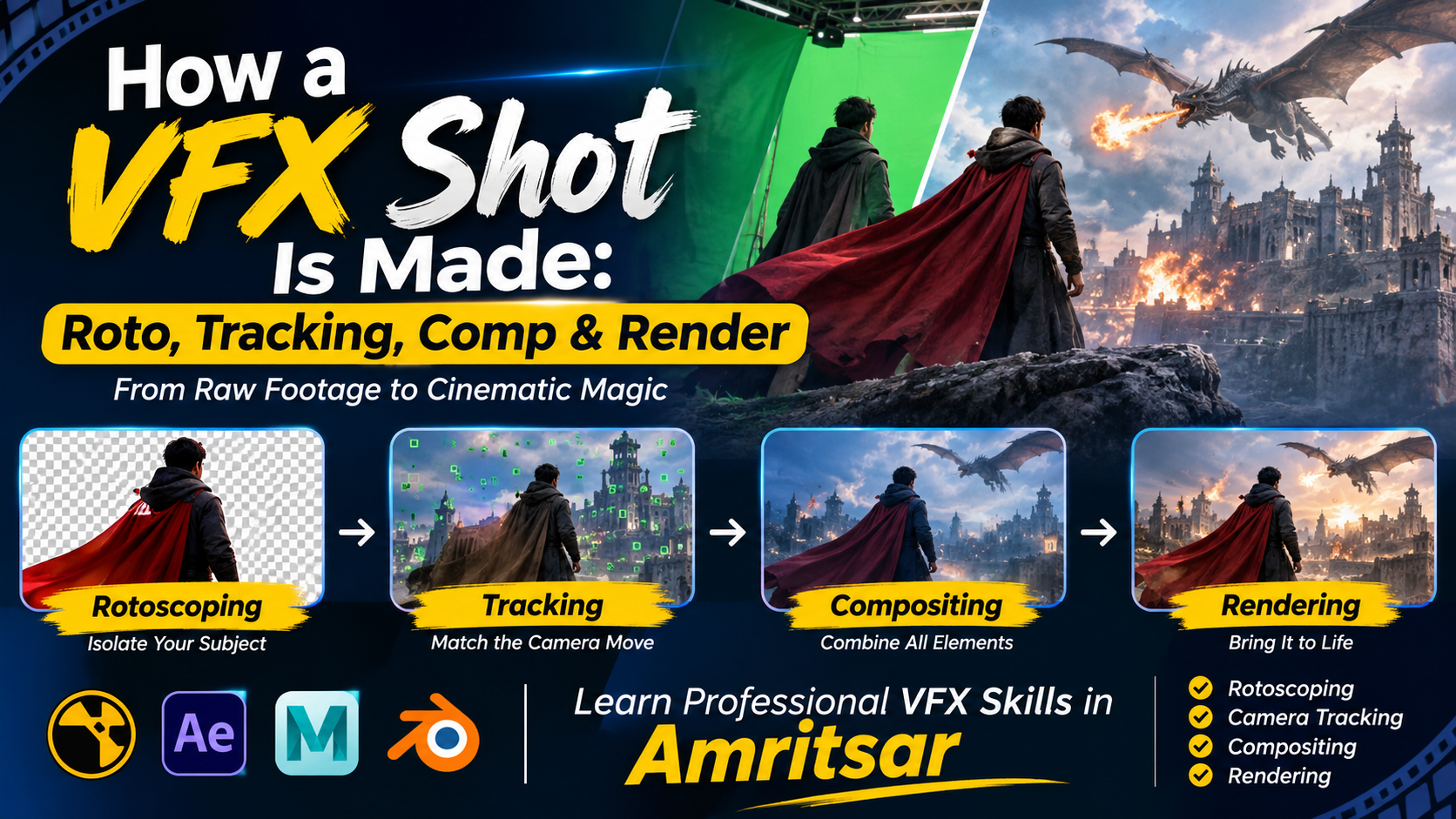
How a VFX Shot Is Made: Roto, Tracking, Comp and Render – Amritsar
Visual effects (VFX) play an important role in modern filmmaking, television, advertising, web series, and digital entertainment. From creating realistic explosions and fantasy environments to removing unwanted objects and combining multiple visual elements, VFX artists transform ordinary footage into extraordinary cinematic experiences.
Understanding how a VFX shot is made helps aspiring artists learn the complete visual effects production pipeline. At IAM Amritsar, students interested in VFX and digital filmmaking can explore essential production techniques, including Rotoscoping, Camera Tracking, Compositing, and Rendering.
Understanding the VFX Production Pipeline
A professional VFX shot is usually created through multiple stages. Each stage has a specific purpose, and all the elements must work together to produce a realistic and visually consistent final result.
Rotoscoping (Roto): Separating Objects from Footage
Rotoscoping is one of the fundamental techniques in visual effects production. It involves creating precise masks around people, objects, or other elements in video footage to separate them from the background.
VFX artists use rotoscoping when they need to replace backgrounds, combine different footage, or place digital elements behind or in front of moving subjects.
What You Learn:
Creating accurate masks around moving subjects.
Understanding Bezier and spline tools.
Performing frame-by-frame masking.
Using tracking-assisted roto techniques.
Refining edges for clean compositing.
Camera Tracking: Matching the Real and Digital Worlds
Camera tracking is the process of analysing camera movement in live-action footage and recreating that movement in a digital environment. It allows artists to add 3D objects, buildings, effects, and digital environments that follow the original camera perspective.
For example, when a filmmaker wants to add a digital spaceship to a moving camera shot, tracking helps the spaceship remain correctly positioned as the camera moves.
What You Learn:
Understanding 2D and 3D tracking.
Tracking camera movement and perspective.
Identifying tracking points.
Solving camera movement in 3D space.
Integrating digital objects into live footage.
Compositing (Comp): Combining Visual Elements
Compositing is the stage where different visual elements are combined to create a single final shot. These elements may include live-action footage, green-screen backgrounds, 3D models, particle effects, lighting, and digital environments.
A compositor ensures that every element looks like it belongs in the same scene.
What You Learn:
Green-screen and chroma key techniques.
Layer-based and node-based compositing.
Colour correction and colour matching.
Adding shadows, reflections, and light effects.
Integrating CGI with live-action footage.
Rendering: Producing the Final Visual Output
Rendering is the process of generating the final image or video from a completed VFX composition or 3D scene. It converts digital elements, lighting, textures, effects, and visual information into the output required for the final production.
Rendering quality depends on several factors, including resolution, lighting, materials, render settings, and output format.
What You Learn:
Understanding render settings and output resolution.
Working with image sequences.
Managing render quality and performance.
Understanding render passes and layers.
Exporting final shots for post-production.
Complete a Practical VFX Shot
The best way to understand the VFX pipeline is to work on a complete shot rather than learning individual techniques separately.
Example Project: Creating a Cinematic Green-Screen Shot
Students can practise a complete visual effects project using the following workflow:
Import and analyse the original green-screen footage.
Separate the subject using rotoscoping and keying.
Track camera movement to match the digital environment.
Add a new background, CGI elements, and visual effects.
Composite all elements with matching lighting and colours.
Render and export the final cinematic shot.
Software Used in VFX Production
Professional VFX workflows use different software applications depending on the production requirements.
The Foundry Nuke: Professional compositing, rotoscoping, tracking, and visual effects.
Adobe After Effects: Motion graphics, keying, tracking, and compositing.
Mocha Pro: Planar tracking, object removal, and advanced roto workflows.
Autodesk Maya: 3D modelling, animation, lighting, and rendering.
Blender: 3D modelling, animation, simulation, and rendering.
Who Can Learn VFX in Amritsar?
VFX training can be useful for:
Students interested in animation and filmmaking.
Beginners interested in visual effects production.
Graphic designers looking to develop advanced creative skills.
Video editors interested in cinematic effects.
Aspiring compositors and roto artists.
Individuals planning careers in film, television, advertising, and digital media.
Career Opportunities After Learning VFX
After developing practical VFX skills and building a strong portfolio, learners can explore opportunities in different creative industries.
Potential career roles include:
Rotoscope Artist
Matchmove Artist
VFX Compositor
Paint and Prep Artist
Lighting and Rendering Artist
VFX Generalist
Digital Effects Artist
Learn Professional VFX Skills in Amritsar
Understanding the complete VFX production pipeline is an important step towards becoming a professional visual effects artist. From isolating subjects with rotoscoping to matching camera movement, combining CGI elements, and producing final renders, every stage contributes to creating realistic cinematic visuals.
Explore VFX learning opportunities at IAM Amritsar and develop practical knowledge of the tools, techniques, and creative processes used in modern visual effects production.
- VFX
- Visual Effects
- VFX Production
- Rotoscoping
- Camera Tracking
- VFX Compositing
- Rendering
- Nuke Compositing