
Blender Geometry Nodes and Advanced Rendering: Amritsar Guide
Product Modeling & Visualization · Harman Phagwara · 24 October 2026
Explore Blender Geometry Nodes and advanced rendering in Amritsar. Learn procedural modeling, realistic materials, lighting, texturing, and 3D visualization through practical projects.
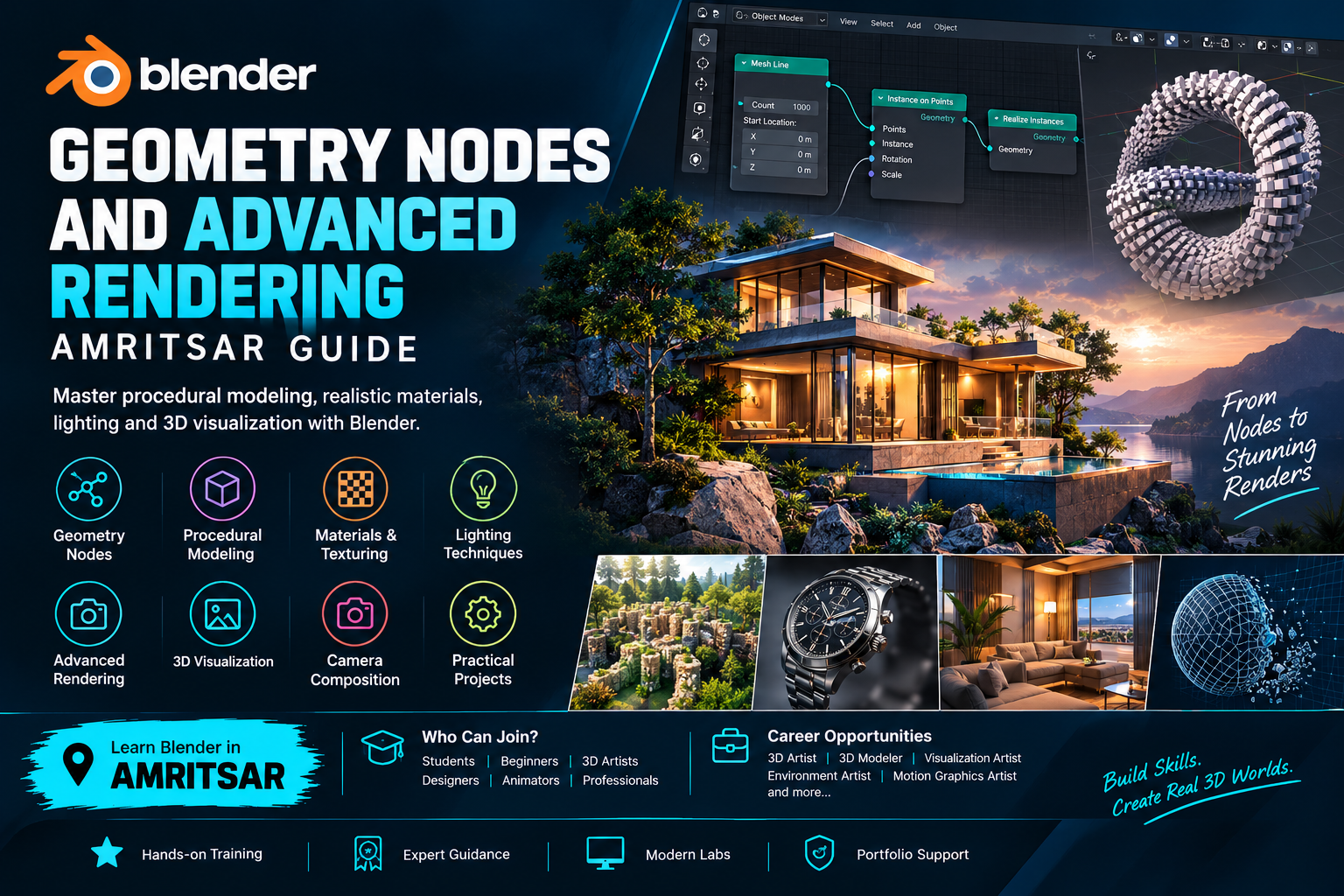
Blender Geometry Nodes and Advanced Rendering: Amritsar Guide
Blender Geometry Nodes and advanced rendering open up new possibilities for students, beginners, 3D artists, graphic designers, animators, architects, and creative professionals who want to develop modern 3D design skills. Whether you are interested in creating detailed 3D environments, procedural objects, realistic product visuals, architectural scenes, or animated content, learning these Blender techniques can help you expand your creative and technical abilities.
Blender is a powerful 3D creation application used for modeling, animation, materials, lighting, rendering, and visual effects. Geometry Nodes provides a node-based system for creating procedural models, repeating patterns, generating complex structures, and building reusable workflows. Advanced rendering techniques help transform 3D scenes into polished visuals through effective lighting, material design, camera composition, and render settings.
This guide explores Blender Geometry Nodes, procedural modeling, advanced rendering, practical project ideas, essential tools, and learning opportunities for individuals interested in 3D design and visualization in Amritsar.
Introduction to Blender Geometry Nodes and Advanced Rendering
Blender Geometry Nodes allows artists to create and control geometry through connected nodes instead of manually modeling every detail. Artists can use procedural systems to generate objects, distribute elements across surfaces, create patterns, build environments, and modify geometry using adjustable parameters.
Advanced rendering focuses on producing high-quality images and animations from 3D scenes. It involves understanding lighting, materials, textures, reflections, shadows, camera settings, render engines, and image quality. Combining Geometry Nodes with rendering techniques allows artists to create visually impressive scenes while maintaining flexible and reusable workflows.
These skills can be useful for product visualization, motion graphics, architectural presentations, game assets, advertising, animation, and digital content creation.
Understanding Blender Geometry Nodes
Geometry Nodes is one of Blender's important procedural tools. It enables artists to create systems that automatically generate or modify 3D geometry according to connected instructions and parameters.
Instead of manually repeating the same modeling steps, artists can create node setups that control the position, rotation, scale, shape, distribution, and appearance of objects. Changes to the input values can update the resulting geometry without requiring the entire model to be rebuilt.
Key Geometry Nodes Concepts
Node-Based Workflows: Connect different nodes to control how geometry is generated, transformed, and displayed.
Procedural Modeling: Create adjustable models using mathematical operations, parameters, and connected node systems.
Instance Distribution: Place repeated objects across surfaces, curves, or points.
Randomization: Introduce variation in object rotation, scale, position, and other attributes.
Curve-Based Modeling: Generate objects, cables, roads, pipes, decorative elements, and other shapes along curves.
Geometry Transformation: Control object position, rotation, scale, and shape through procedural operations.
Reusable Node Groups: Organize node systems into reusable setups that can be adapted for different projects.
Attribute Control: Work with geometry data to influence the appearance and behavior of procedural elements.
Understanding these concepts helps learners develop efficient modeling workflows and experiment with complex 3D designs.
Procedural Modeling with Blender Geometry Nodes
Procedural modeling is a technique in which geometry is created or modified using a defined system of rules and parameters. Geometry Nodes makes this process more flexible by allowing artists to change values and update designs quickly.
For example, a procedural building system can generate different structures by adjusting the height, number of floors, window spacing, and other properties. A procedural environment can distribute trees, rocks, grass, or other assets across a landscape.
What You Can Create with Procedural Modeling
Repeating architectural patterns and building components
Procedural walls, fences, roads, and pathways
Decorative objects and geometric patterns
Rocks, vegetation, and environmental assets
Product arrangements and repeated design elements
Abstract 3D shapes for motion graphics
Modular objects for games and visualization
Procedural surfaces and stylized landscapes
Procedural modeling is particularly useful when a design contains repeated elements or requires frequent variations. It can reduce repetitive work and make complex scenes easier to adjust.
Creating 3D Objects and Environments
Blender Geometry Nodes can support the creation of individual objects as well as larger environments. By combining procedural modeling with traditional modeling techniques, artists can create detailed scenes while maintaining control over their design.
For example, a 3D environment might contain buildings, roads, plants, rocks, lights, and decorative elements. Geometry Nodes can help distribute repeated assets, generate variations, and create consistent patterns throughout the scene.
Practical Environment Design Techniques
Create basic terrain and landscape elements.
Distribute trees, plants, and rocks across selected surfaces.
Generate repeating architectural components.
Build roads, pathways, fences, and other linear structures.
Add random variations to repeated objects.
Organize scene elements for easier editing.
Combine manually modeled assets with procedural systems.
These techniques are useful for environment design, architectural visualization, animation backgrounds, and game environment development.
Blender Materials, Texturing, and Shading
Materials and textures determine how surfaces appear in a rendered scene. They influence colour, roughness, metallic appearance, transparency, and the way surfaces respond to lighting.
Blender's material system allows artists to build materials using nodes. By connecting different shaders, textures, and mathematical operations, artists can create a wide range of surface appearances.
Important Material and Texturing Skills
Understanding the Principled BSDF shader
Creating metal, glass, plastic, wood, stone, and fabric materials
Applying image textures to 3D objects
Understanding UV mapping fundamentals
Controlling roughness, metallic values, and surface colour
Using procedural textures such as Noise and Voronoi
Combining textures through shader nodes
Creating surface variations and realistic details
Adjusting bump and normal information
Organizing reusable material setups
For example, a product visualization project may require polished metal, transparent glass, and a matte plastic surface within the same scene. Understanding materials helps artists make these objects visually distinct and more convincing.
Advanced Rendering in Blender
Rendering converts a 3D scene into a final image or animation. Advanced rendering involves improving image quality, controlling light, selecting suitable render settings, and balancing visual results with processing time.
Blender offers different rendering approaches, including Eevee and Cycles. Their capabilities and performance characteristics vary by Blender version, hardware, scene complexity, and project requirements.
Eevee is useful for many real-time and interactive rendering workflows, while Cycles uses path tracing to simulate light transport and can produce highly realistic results. The best choice depends on the intended output, required visual quality, and available hardware.
Essential Rendering Skills
Choosing suitable render engines and settings
Understanding samples and noise reduction
Managing image resolution and output quality
Adjusting render performance for available hardware
Using denoising where appropriate
Balancing quality and render time
Preparing scenes for still images and animation
Organizing output formats and render settings
Troubleshooting common rendering issues
Learning these techniques helps artists produce clean, consistent images while making more effective use of computing resources.
Lighting Techniques for Realistic 3D Scenes
Lighting is one of the most important elements of 3D visualization. Even a detailed model can look flat or unrealistic when the lighting is poorly arranged. A well-planned lighting setup helps communicate shape, material, depth, and atmosphere.
Blender supports different light types, including point, sun, spot, and area lights. Artists can combine these with world lighting and environment textures to create different visual styles.
Lighting Concepts to Explore
Key, fill, and rim lighting
Three-point lighting arrangements
Soft and hard shadows
Studio lighting for product visualization
Natural lighting for outdoor environments
HDRI-based environment lighting
Colour temperature and light intensity
Reflection control and highlight placement
Light positioning for depth and contrast
Lighting for animation and cinematic scenes
For product renders, soft area lights can help create controlled highlights and attractive reflections. For architectural scenes, natural lighting can communicate the time of day and the atmosphere of a space.
Camera Composition and 3D Visualization
Camera placement influences how a 3D scene is understood by the viewer. Composition guides attention, highlights important objects, and establishes visual balance.
A strong camera setup combines suitable framing, focal length, perspective, depth, and lighting. These principles are useful for product renders, architectural presentations, animation, and promotional visuals.
Important Camera and Composition Techniques
Understanding perspective and focal length
Choosing suitable camera angles
Applying the rule of thirds
Creating balanced visual compositions
Using depth of field where appropriate
Directing attention toward the main subject
Framing architectural and product scenes
Maintaining consistent camera settings across a project
Planning camera movement for animation
Practising these techniques helps artists present their models more professionally and communicate design ideas clearly.
Practical Projects Using Geometry Nodes and Advanced Rendering
Practical assignments help learners apply procedural modeling, materials, lighting, and rendering techniques to complete 3D projects. Starting with simple scenes and gradually increasing complexity is a useful way to build confidence.
Project 1: Procedural Pattern Generator
Create a system that generates repeating geometric shapes or decorative patterns. Use Geometry Nodes to control object spacing, rotation, scale, and variation.
Project 2: Procedural Fence or Wall
Build a reusable node setup that distributes posts, panels, or other components along a curve. Experiment with spacing, height, and different component designs.
Project 3: 3D Product Visualization
Model or prepare a product, create suitable materials, arrange studio lighting, position the camera, and produce a polished render. Focus on reflections, shadows, surface details, and composition.
Project 4: Procedural Environment
Create a small outdoor scene and use Geometry Nodes to distribute trees, rocks, plants, or other assets. Add materials, environmental lighting, and a camera to produce a finished image.
Project 5: Abstract Motion Graphics
Create procedural shapes and repeating elements for a visually engaging abstract scene. Experiment with colour, materials, lighting, and animation to develop a short motion graphics sequence.
Project 6: Architectural Visualization
Develop a simple architectural scene containing buildings, surfaces, vegetation, and lighting. Use procedural systems for repeated elements and apply rendering techniques to present the design clearly.
These projects can help learners understand how different Blender features work together and provide examples of their abilities for a portfolio.
Geometry Nodes Workflow and Best Practices
A well-organized procedural workflow makes complex scenes easier to understand, edit, and maintain. Rather than connecting every operation in one large node tree, artists can separate tasks into logical sections and use reusable node groups.
Recommended Workflow
Define the intended shape, object, or scene before creating the node system.
Start with simple geometry and add complexity gradually.
Name important nodes and node groups clearly.
Use meaningful parameters to make the setup easier to control.
Test the system with different input values.
Keep geometry and material workflows organized.
Check object scale and transforms when troubleshooting.
Use instances where suitable to manage repeated assets efficiently.
Test rendering early instead of waiting until the entire scene is complete.
Save incremental project versions to protect your work.
These practices help improve workflow clarity and reduce unnecessary revisions.
Improving Rendering Performance
Advanced rendering requires a balance between image quality and processing time. Large textures, complex materials, high sample counts, detailed geometry, and heavy lighting calculations can increase rendering demands.
Understanding basic optimization techniques helps artists work more efficiently, especially when using laptops or computers with limited graphics resources.
Rendering Optimization Tips
Use an appropriate output resolution during testing.
Reduce sample counts for previews and increase them when needed for final output.
Enable suitable denoising options.
Avoid unnecessary geometry and excessively detailed assets.
Use instancing for repeated objects when appropriate.
Reduce texture resolution when full detail is unnecessary.
Check lighting and materials using small test renders.
Use render regions or cropped previews to test specific areas.
Manage scene complexity before rendering long animations.
Select the render engine according to the project requirements.
The ideal settings depend on the scene, hardware, Blender version, and desired quality. Test renders are often the most practical way to identify a suitable balance.
Who Can Learn Blender Geometry Nodes and Advanced Rendering?
Blender Geometry Nodes and advanced rendering can be useful for individuals interested in 3D creativity, visualization, animation, and digital production.
The subject may be suitable for:
Students interested in 3D design and animation
Beginners exploring Blender and computer-generated imagery
Graphic designers expanding into 3D visualization
Animators interested in procedural workflows
Product designers creating digital presentations
Architecture and interior visualization learners
Motion graphics artists
Game asset and environment creators
Freelancers developing 3D design services
Creative professionals upgrading their technical skills
Beginners can start with Blender's interface, basic modeling, and materials before moving to Geometry Nodes and advanced rendering. Familiarity with 3D modeling can make advanced topics easier, but the learning path can be adapted to individual experience and goals.
Career Opportunities After Blender Training
Blender skills can support a range of creative and technical career paths. Geometry Nodes and rendering are especially relevant when projects require procedural assets, polished visuals, or efficient 3D production workflows.
Depending on practical experience, portfolio quality, and industry requirements, learners may explore roles such as:
3D Artist
3D Modeler
3D Visualization Artist
Product Visualization Artist
Environment Artist
Motion Graphics Artist
3D Generalist
Architectural Visualization Assistant
Animation Artist
Freelance 3D Designer
Career opportunities vary according to the learner's broader skills, software knowledge, communication abilities, and the needs of potential employers or clients. Building a focused portfolio with completed projects is an important step toward demonstrating practical ability.
Building a Blender Portfolio
A portfolio provides evidence of your modeling, procedural design, material, lighting, and rendering skills. Instead of showing only isolated exercises, include projects that demonstrate a complete workflow from concept to final image.
A useful Blender portfolio may include:
A procedural modeling project with adjustable parameters
A product render showing materials and studio lighting
An environment featuring procedural asset distribution
An architectural scene with considered camera composition
A short motion graphics animation
A breakdown of Geometry Nodes and shader setups
Before-and-after examples showing improvements to lighting and materials
Where possible, include screenshots of node trees, viewport previews, wireframes, and final renders. These help viewers understand how the result was created, not just what it looks like.
Learning Blender Geometry Nodes and Advanced Rendering in Amritsar
For learners exploring Blender training in Amritsar, a structured learning plan can help connect fundamental 3D skills with more advanced procedural and rendering techniques. Look for learning opportunities that include guided practice, realistic assignments, project feedback, and time to experiment independently.
A well-rounded learning plan may cover Blender navigation, basic modeling, materials, lighting, Geometry Nodes, procedural modeling, camera composition, render settings, and portfolio development. The exact syllabus, software version, course duration, available equipment, and practical facilities should be confirmed with the training provider.
Hands-on practice is particularly important because Geometry Nodes and rendering are best understood by creating and refining real projects. Start with small procedural models, test different material and lighting combinations, and gradually progress toward more complex scenes.
Tips for Choosing a Blender Training Program
Before choosing a course or training program, consider your current experience, creative interests, and intended projects.
Review the syllabus: Check whether it includes Geometry Nodes, procedural modeling, materials, lighting, and advanced rendering.
Ask about practical work: Find out whether learners complete projects rather than only follow demonstrations.
Check software versions: Confirm which Blender version and rendering tools are used.
Understand prerequisites: Ask whether basic modeling knowledge is recommended.
Review portfolio outcomes: Find out how projects are developed and presented.
Confirm course details: Verify fees, duration, batch timings, equipment, and eligibility directly with the provider.
Consider your goals: Product visualization, animation, architecture, and procedural environment design may require different project priorities.
Choosing a program that matches your goals can help you focus your time and develop relevant skills.
Enquire About Blender Geometry Nodes and Advanced Rendering in Amritsar
If you want to explore procedural modeling, Geometry Nodes, realistic materials, lighting, and advanced rendering, ask about the available Blender training options in Amritsar. Request details about the syllabus, practical projects, software version, course duration, batch timings, eligibility, and admission process before enrolling.
With consistent practice, experimentation, and a portfolio of completed projects, learners can develop a stronger understanding of Blender and explore creative opportunities in 3D design, visualization, animation, and digital content production.
- Blender Geometry Nodes
- Blender Advanced Rendering
- Blender Course in Amritsar
- Geometry Nodes Training
- Procedural Modeling
- Blender 3D Modeling
- 3D Rendering
- Blender Lighting and Materials